
v2.9.0
FORXAI Video Vision is a platform utilizing image processing and artificial intelligence to detect and analyze defects in manufacturing and assembly lines. These release notes pertain to version 2.9.0.
Compatibility
The Video Vision platform was tested on Ubuntu Server 22.04.5 LTS.
Fixed issues
Significantly improved the load times of Reporting entries by optimizing data storage and retrieval.
Improvements and updates
Basler camera hardware trigger
Added support for a hardware trigger, an external signal that controls when the camera captures an image. This ensures precise synchronization in applications such as defect detection, conveyor belt tracking, and high-speed monitoring. By using a hardware trigger, image capture can be aligned with external events, reducing latency and improving accuracy in time-sensitive workflows
Dynamic model switching
Added support for Dynamic model switching, enabling seamless transitions between AI models at runtime without requiring a system restart. This enhances flexibility in environments where different models are needed for different tasks, reducing downtime and manual intervention.
For example, a production line handling multiple product types can automatically switch between defect detection models based on the item being processed.
New nodes
 Dynamic AI Model
The Dynamic AI Model node implements the dynamic model switching capability within the workflow. It allows users to configure multiple machine-learning models and swap between them as needed without restarting the deployment.
Unlike the standard AI Model node, which runs a single preloaded model, the Dynamic AI Model node can dynamically load and unload models, making it ideal for workflows that require adaptability—such as detecting defects across different product categories or optimizing resource use when GPU memory is limited. Learn more.
 Overlay Heatmap
The Overlay Heatmap node overlays a heatmap onto an image, allowing you to visualize data directly within the image context. The node includes options to adjust the heatmap’s opacity and select from several predefined color gradients. Learn more.
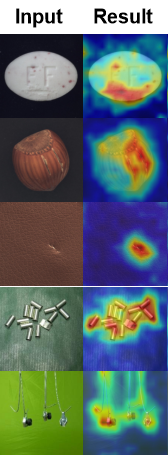
Heatmap overlay example