
Video Vision
FORXAI Video Vision is a powerful video analytics tool that helps production and manufacturing facilities improve their quality control processes. Video Vision uses artificial intelligence and deep learning (AI) to detect objects and identify potential defects, flaws, or other product imperfections. The solution combines Mobotix smart camera technology with modern AI algorithms to provide customers with valuable data and an effective monitoring system for operational efficiency.
Video Vision automates faulty object identification to free up human operators for more productive tasks. The customizable machine learning algorithms allow the system to be tailored to each customer’s specific needs. Video Vision creates an effective monitoring system, which helps improve operational efficiency and quality control across various industries.
Manual quality inspection relies on human judgment. The inconsistency inherent in this approach increases the risk of errors (miscalculated objects, misclassified or overlooked defects, false positives, etc.). The resulting loss of quality increases production costs and waste. The time-consuming process also increases human resources costs related to retaining a qualified workforce.
Video Vision is designed to address these challenges. The solution uses deep learning technology to replicate the analysis of products on the production line, eliminating the imperfections of human vision and judgment. The results of the inspection can be integrated with your internal system for improved process integration and data analysis.
Features
Dashboard
The dashboard is the primary environment for interacting with the application.
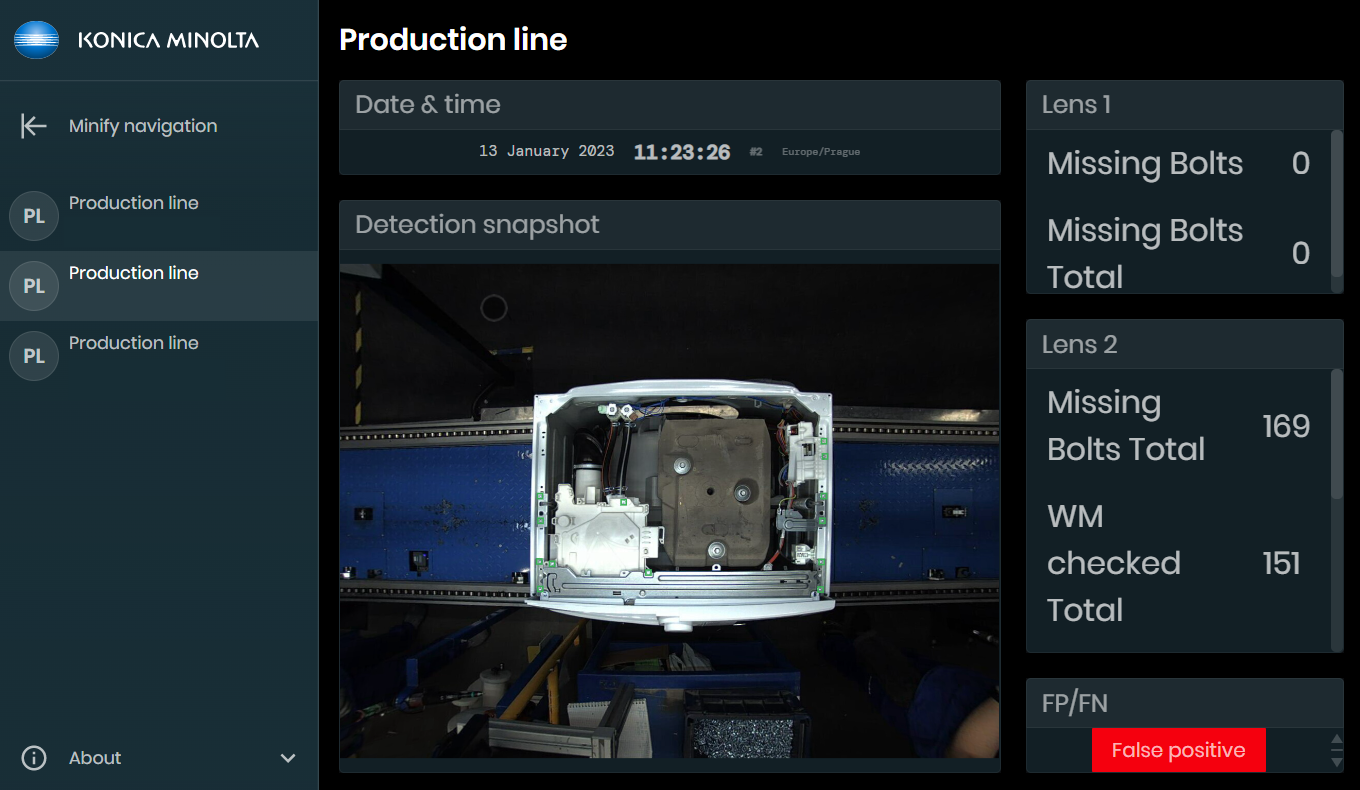
Application Dashboard
The real-time dashboard displays key information. Marked indicators of detected defects and issues appear in the GUI to alert the operator. The indicators that appear depend on the use case.
The interface also shows the operator whether the inspected object is faultless, along with additional information based on the use case (type of defect, number of missing elements, etc.). This provides immediate information about the objects under examination, enabling real-time action to be taken based on the data output.
The video image used for the inspection also appears on the dashboard, enhanced by annotations of the important places, such as places where defects have been identified or placement of elements that are subject to assembly check. This connects the detection result with the actual object, allowing a reaction to be targeted onto the problematic area – such as adding the one missing bolt as highlighted by the system.
Widgets
The dashboard contains multiple widget types based on the customer’s specific needs.
Each use case comes with a default layout of widgets, but users will have the ability to customize both the layout and select individual widgets in the future.
Customization of the widget layout and size is possible in the platform.
Widget categories
Image widgets
Display either processed images from the production line or a live stream from the camera.
Statistical widgets
Display counted values of items based on their type, whether they are defective, or any additional parameters and information related to the items.