
Unreachable server because of SSH
Symptom
The server has a correctly assigned IP address (you can ping it), but you are unable to establish an SSH connection. Error message example:
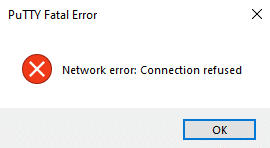
Explanation
The SSH service is most likely not running, or it is not installed.
Solution
To verify the functionality of the SSH service, follow these steps -
Verify the SSH service is installed
Run the following command:
CODEsudo systemctl status sshd.serviceIf the terminal output displays the service is installed (example output below), skip to the next section of SSH troubleshooting.

If the output says the service could not be found, enter the following command:
CODEsudo apt updatethen the following command:
CODEsudo apt install openssh-server
Continue with the following section of the troubleshooting.
Check the SSH service is running properly
Start the terminal.
Run the following command:
POWERSHELLsudo systemctl status sshd.serviceCheck the Active row in the terminal output. If the service is inactive, run the following command:
CODEsudo systemctl start sshd.servicethen repeat the first command to recheck the status:
CODEsudo systemctl status sshd.serviceCheck the Loaded row in the terminal output. If the service is disabled, run the following command:
CODEsudo systemctl enable sshd.service
This ensures the service will be automatically started after every boot.